
3D Puff Embroidery Fonts That Actually Work on Hats
You've found a font that looks perfect on a screen. The letters are bold, the spacing feels sharp, and the mockup makes the hat look like a premium streetwear piece. Then the sample comes back with fuzzy edges, broken counters, and foam showing through the smallest strokes.
That result usually isn't a machine problem. It's a font geometry problem. The best 3D puff embroidery fonts aren't just heavy versions of ordinary lettering. They're built to let satin stitches cover, compress, and cut foam cleanly on a curved structured crown.
Why Font Choice Makes or Breaks 3D Puff Embroidery
A thin cursive logo can look polished on a structured cap mockup, then fail during production. The narrow downstrokes, elegant connectors, and boutique styling may suit digital artwork, but foam exposes every weak point in the letter geometry.
The digitizer may flag the design before stitching begins. If the customer proceeds, the raised substrate can overwhelm the narrow strokes. Registration may shift as the needle works across the curved front panel, while small loops collapse into ragged lines. The finished cap can match the approved artwork and still miss the clean appearance of the proof.
That gap comes from screen weight versus production weight. A line may appear bold on a monitor because of its color and contrast. In puff embroidery, the satin columns need enough width to cover the foam edge and compress the substrate. A technical guide recommends avoiding elements under 6 mm wide, since they have difficulty providing clean foam coverage (SewFlow's puff embroidery guidance).
Foam changes the rules
Puff embroidery uses a subtractive process. Foam sits beneath the top stitches, and the needle perforates around the design until the excess material can be removed. The thread forms the visible boundary, leaving thin strokes, small openings, and sharply tapered terminals with little room for error.
A structured cap gives the raised design a firm crown to work against. Its stable front panel helps the puff remain visible, which explains why the technique is commonly used for cap lettering and logos rather than delicate artwork (this overview of 3D puff embroidery).
Production rule: Choose the font for the stitch file, not for the website mockup.
Bold block faces, varsity alphabets, and rounded display fonts generally hold up because their strokes provide enough surface area for satin coverage. A fine script can work in limited cases, usually with a short word, generous spacing, and custom digitizing. If the lettering relies on hairlines or tight loops for its character, foam will often remove the details that made the font attractive in the first place. The culprit is rarely the machine. Font geometry dictates the outcome.
The Geometry Behind a Puff-Friendly Font

A puff-friendly font must survive as a set of supported shapes, not merely look bold on a screen. Inspect stroke width, counters, and terminals before judging the font name or style.
Start with stroke width
For cap lettering, practical satin columns typically fall around 0.2 to 0.5 inches wide, as outlined in MaggieFrame's guide to puffy font geometry. Use that range as a proofing check, not a design shortcut. Measure the narrowest working part of each letter. A font may appear heavy overall while its middle sections drop below the usable width.
Below that range, the foam can overpower the stitched boundary. Above it, broad shapes may require more needle movement and can increase jump stitches or needle deflection. The failure is easy to spot in a thin condensed script. A downstroke narrows through the middle, leaving too little satin area to contain the foam. After trimming, the stroke can look fuzzy, broken, or uneven.
A block letter with a stable vertical column keeps its silhouette because the thread has enough area to compress the foam and define the edge. That is the geometry behind the familiar recommendation to choose bold lettering.
Protect the counters
Counters are the open spaces inside A, B, D, O, P, and R. They need enough negative space for foam to exit without leaving bridges across the opening. Tight inner spacing can turn a letter into a solid mass, even when the outer column is wide enough.
Review a raised sample rather than approving a flat proof alone. Check whether each hole remains visibly open after the foam lifts and the excess is removed. 3D embroidery machine options may differ, but equipment cannot make a fragile counter durable. It can only reproduce the file accurately.
Watch the terminals
Tapered terminals create weak points. A script may finish in a narrow flourish, while a display face may end with a pointed wedge. Foam and needle penetration can break through those narrow sections, leaving an uneven tip.
Use these checks before approving a font:
- Fuzzy outside edges usually indicate insufficient column width or coverage.
- Visible foam between letters often points to cramped spacing or incomplete removal.
- Broken loops suggest that a curved stroke or counter is too narrow.
- Muddy corners can result from excessive density or an overly complicated outline.
Block, varsity, collegiate, and stylized display faces all need a supported outer wall and enough open space for clean foam removal. The style changes. The production requirements do not.
Sizing, Spacing, and the Numbers That Actually Matter
A font can look clean in the digitizing window and fail on the cap. Reduction changes the relationship between letter height, satin-column width, spacing, and foam coverage. Set those measurements against the actual crown and foam before approving the alphabet.
For standard caps using 3 mm foam, use approximately 0.4 inches as a minimum letter height. High-profile caps with 6 mm foam generally need about 0.6 inches. Jackets and bags use about 0.5 inches, while patches can work around 0.35 inches. These figures are production markers from Panda Digitizing's puff embroidery tips, not guarantees. A complicated letter may need more height even when the overall design meets the guideline.
Measure the smallest working feature
Start with the finished application, not the font menu. On a structured cap, a short word in a sturdy block face can often be tested near the standard-cap minimum. A taller crown paired with thicker foam needs more letter height because the satin columns must enclose a deeper raised surface. Treat small secondary text as its own design. The main wordmark's size does not make a smaller line safe.
Column width controls coverage. Practical puff lettering guidance places columns around 0.2 to 0.5 inches. Below 0.2 inches, the satin may fail to cover the foam. Above 0.5 inches, stitch concentration and needle movement can create production problems, as described in MaggieFrame's puffy font guidance.
Spacing protects letter definition. Adjacent puff elements need enough separation for the foam to be cut cleanly. If they touch, the foam can bridge the gap and turn two letters into one heavy shape. Check the narrowest production stroke after scaling, not only the nominal font size.
Use this reference while testing:
- Standard cap, 3 mm foam: about 0.4 inches minimum height. Smaller lettering gives the satin less reliable foam coverage.
- High-profile cap, 6 mm foam: about 0.6 inches. Deeper foam needs more wall height to stay enclosed.
- Jackets and bags: about 0.5 inches. Smaller details can lose definition against the material.
- Patches: about 0.35 inches. Counters and terminals have less room to clear cleanly.
- Column width: keep the working range near 0.2 to 0.5 inches. Thin columns expose foam, while very wide columns can create stitch and needle issues.
- Narrow elements: avoid widths below 6 mm. Thin strokes are more likely to break or show foam, a limitation also discussed by SewFlow.
The production question is simple: after scaling to the actual cap front, does the narrowest stroke still support full foam coverage and clean separation? If not, increase the size, simplify the lettering, or choose a more suitable font.
Font Styles That Work on Hats and the Looks They Create
A font can look premium on a screen and collapse after it is scaled onto a structured cap. Puff changes the visual weight, so the useful question is not only which family matches the brand. Check whether its geometry leaves enough room for covered foam, open counters, and clean separation at the final size.
Match the family to the brand
| Font Family / Look | Example Fonts | Application Notes | Best For |
|---|---|---|---|
| Block and athletic | Impact, Varsity, College Block, Bebas Neue | Broad verticals and short horizontals give puff a solid, even surface. | Sports teams, gym brands, workwear, bold logos |
| Condensed and vertical | Bebas, Oswald, Anton | Keep words short and inspect the thinnest stem. Tall letters can look strong in a mockup while losing coverage on the cap. | Streetwear, breweries, narrow wordmarks |
| Collegiate and varsity | Collegiate, College Block, sturdy Old English variants | Choose sturdy stems and open counters. Decorative cuts and tight internal spaces need simplification before sewing. | Schools, teams, fraternities, heritage brands |
| Retro and curved | Cooper, rounded varsity styles, Lobster | Curves suit raised embroidery when counters stay open and terminals remain substantial. | Diners, barbershops, vintage labels, playful merchandise |
Block and athletic faces are usually the safest starting point because their verticals and horizontals produce predictable satin columns. Impact suits a short, heavy word. College Block and varsity styles add team structure, but small interior gaps can close once the foam lifts the surface.
Condensed faces such as Anton and Oswald need a letter-by-letter check. Their height creates presence, yet the narrowest stem may leave too little room for thread coverage. Treat the working width as an application decision, not a rule to repeat across every family. A short word with broad stems can work; a long word forced into a narrow front panel usually needs a different font or a larger cap area.
Collegiate lettering brings school and heritage associations. Old English variants can work when their main stems remain broad and their counters stay visibly open. Thin cursive that imitates the same mood behaves differently. Its hairlines and flourishes can disappear even when the lettering looks convincing in artwork.
Rounded retro faces add a softer, more playful signal. Cooper and similar styles benefit from puff's volume, but closed counters and fine swashes still need correction. Remove or widen details that cannot maintain foam overlap at the actual sew-out size.
For brand work, use one puff layer for the primary wordmark and keep taglines, dates, and small supporting text flat. That contrast protects legibility and controls stitch complexity. Review examples of custom puff embroidery hats when deciding how much of a cap design should rise from the crown.
Digitizing Rules That Protect Your Font Under Foam
A font can look clean on screen and still sew as a muddy shape. Puff demands a stitch plan designed for foam compression, with column width, overlap, density, and test sewing set for the actual cap.
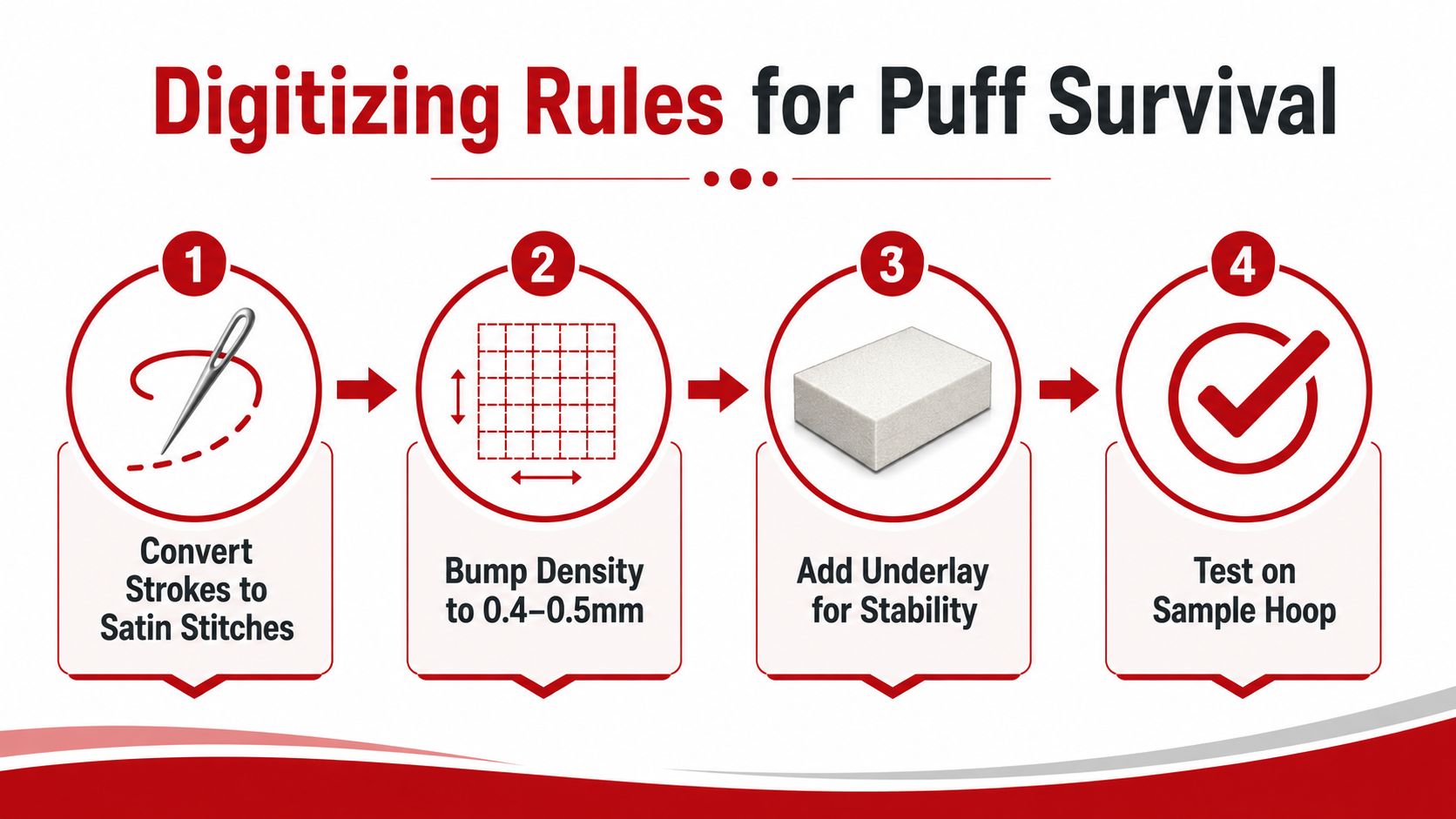
Build the columns for coverage
Use satin stitches for the raised letter faces. Their continuous stitched walls cover the foam edge more reliably than fill or running stitches. Set each column wide enough to carry the thread cleanly, then allow the satin stitches to extend about 1 to 2 mm beyond the foam edge. That overlap helps conceal the substrate after the excess foam is removed.
Density needs control as well. Technical guidance recommends increasing satin density by 40 to 60% above normal and using about 0.3 to 0.5 mm of pull compensation to limit gaps and distortion. Those settings are a starting point, not a universal preset. Excess density can flatten the foam and make the lettering feel packed down, so coverage must be balanced against the raised height.
Set spacing and direction deliberately
Counters and gaps need room for foam removal. A narrow opening or cramped letter pair may close into one fused shape after stitching, even if the vector artwork appears separate.
Stitch direction should support each form. Tall block stems commonly use vertical satin direction, while shorter horizontal elements may need another angle. Curves need a direction that follows their turn, rather than forcing every column into the same orientation.
A practical check is to review the file at the final sew-out size. Confirm the narrowest column, smallest counter, and tightest letter spacing before sending it to the machine. The font's style matters, but these geometric details decide whether it survives foam.
Before production, sew a sample on the chosen crown. Screen simulation helps verify stitch order, yet it cannot show how a particular cap panel compresses the foam or how the thread covers its edge.
For file preparation, professional logo digitizing guidance helps frame the artwork as a stitch strategy. The font is only the starting point. Satin width, foam overlap, density, compensation, underlay, and testing determine whether the finished cap looks intentional.
When 3D Puff Is the Wrong Call
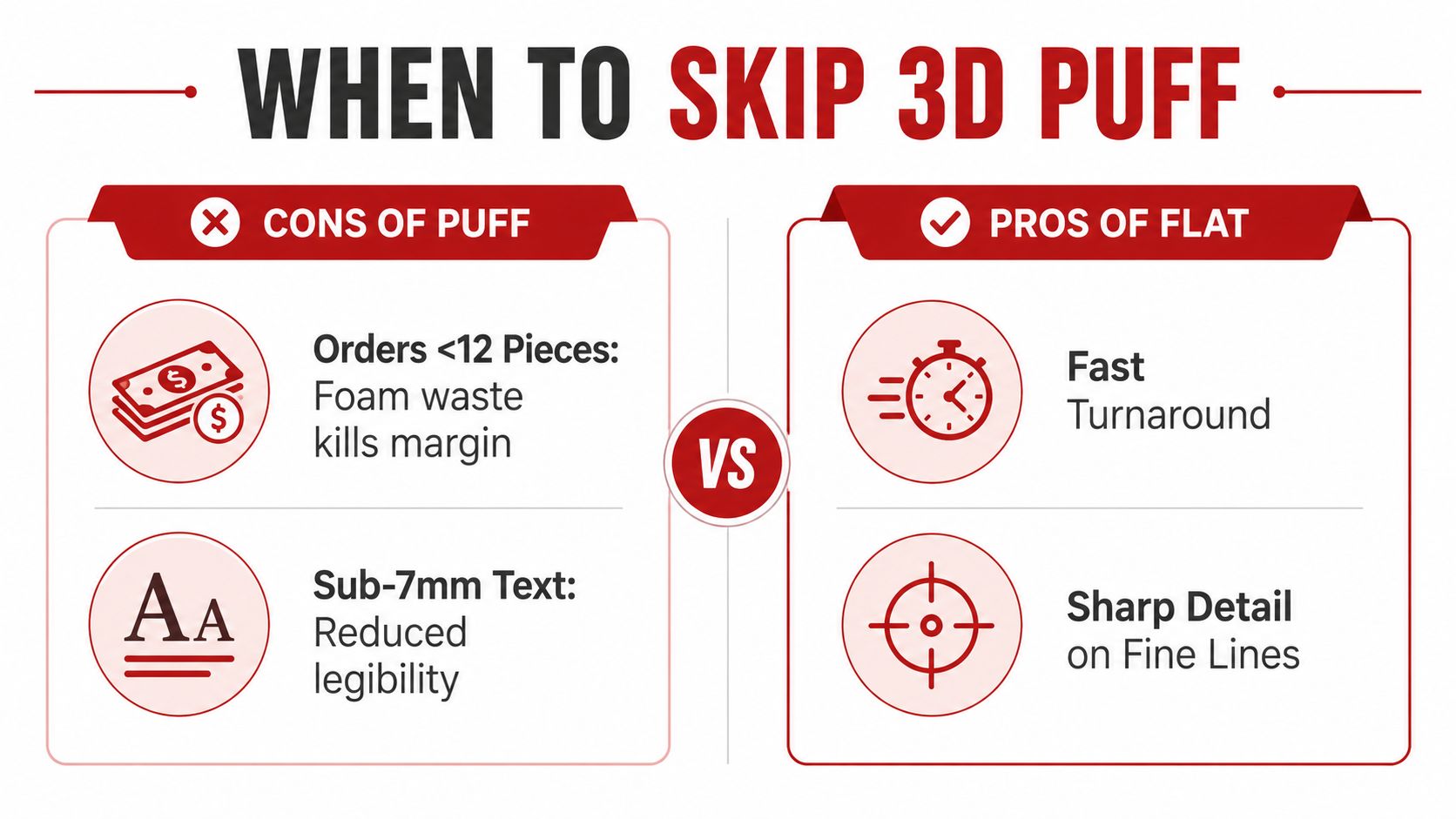
A structured cap arrives with a delicate script logo and a small tagline. Raising the entire design would make the hairlines merge, bury the tagline, and turn a refined mark into a heavy block. Puff creates presence, but it is not automatically the right production choice.
Flat embroidery usually wins when readability depends on small text, fine lines, or several internal details. Foam needs room around each raised column, and narrow strokes cannot maintain the same clean separation as flat stitching. A font may look attractive on screen yet fail once its column width and foam overlap are judged at the final cap size.
Choose flat when clarity matters more than height
Fine script often keeps its character in flat thread because its hairlines remain open. Under foam, those strokes can merge into uneven shapes. Multicolor designs, small counters, and intricate crests may also lose their visual hierarchy when the raised layer becomes the dominant feature.
Cap construction changes the result. A structured crown supports puff more consistently, while washed twill and unstructured panels can absorb the relief unevenly. The same font may look crisp on a firm front panel and lumpy on a soft, collapsing cap.
Flat embroidery also suits small production runs when setup and foam handling add work without improving the customer's design. For a mixed treatment, reserve puff for the main initials or wordmark. Keep the tagline, location, and supporting copy flat. That division protects legibility while letting the primary lettering carry the raised effect.
Your Pre-Production Checklist and Common Pitfalls
A puff logo can look open on screen and close up on the cap. Before approving the file, reduce the artwork to its finished size on the actual front panel. Check the narrowest column, the smallest counter, and the foam overlap around neighboring letters. Those three measurements usually decide whether the font looks premium or collapses into a raised block.
Check the artwork at actual size
Use a physical proof or sew-out for fine curves, unusual lettering, condensed names, or mixed puff and flat details. Confirm the design on the same structured cap, fabric color, and front-panel construction planned for production.
Use this preflight list:
- Confirm letter height: Measure the main lettering at finished size and compare it with the selected foam and cap requirements. A standard cap with 3 mm foam may call for about 0.4 inches, as outlined by Panda Digitizing.
- Inspect counters: Check that internal openings remain wide enough to remove foam cleanly.
- Check character spacing: Keep visible gaps between adjacent puff columns so foam and stitches do not merge.
- Review the crown: Sew the design on the same structured style and front-panel build used for the order.
- Study the stitch file: Confirm satin-only letter construction, controlled density, pull compensation, underlay, and accurate foam placement.
- Look for weak terminals: Widen or simplify hairlines, sharp points, and small loops before digitizing.
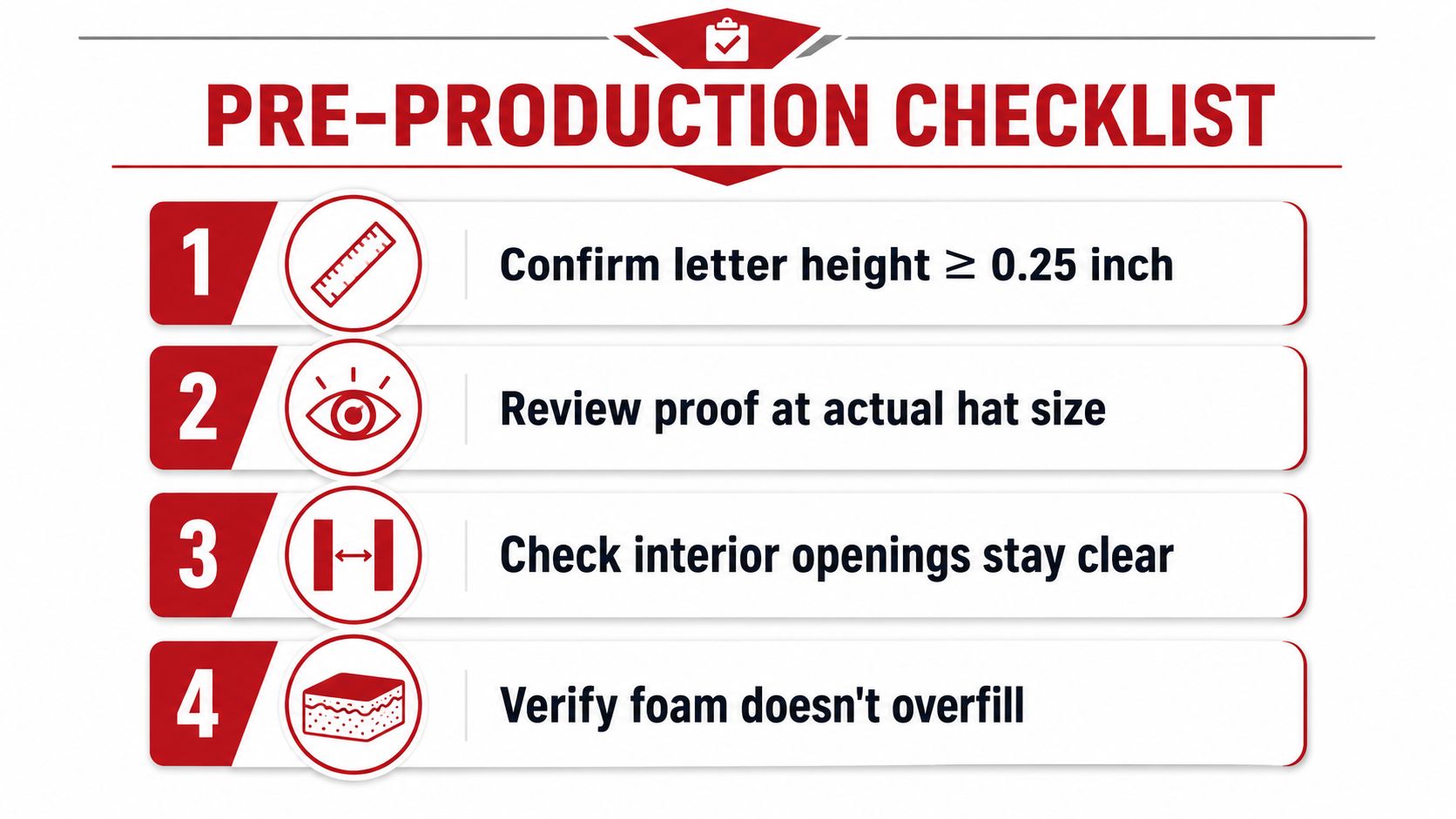
The common failure is approving the outline instead of the stitch architecture. A script may need wider hairlines. A long name may need fewer characters or a larger cap area. Metallic thread can also bury tiny copy, even when the alphabet itself suits puff.
Review the sew-out for foam visibility, registration, stitch direction, spacing, and readability. Approve only when the lettering is bold enough to read, open enough for clean foam removal, large enough to stitch, and simple enough to reproduce consistently.
Dirt Cheap Headwear offers custom headwear with 3D puff and fine-detail embroidery, structured cap options, and low-minimum custom orders. Visit Dirt Cheap Headwear with your logo, hat style, and target lettering size, then request a production review before approving the puff font.